

For years, there was one frugal practice that was celebrated across the personal finance blogosphere as one of the simplest and most effective ways to trim your expenses: cord-cutting. As the cost of cable television climbed higher than ever before and services like Netflix and Hulu began building their libraries, streaming emerged as an appealing alternative, allowing viewers to access their favorite shows for a fraction of the price.
In 2020, however, the landscape is changing once again. With streaming now recognized as a key player in the way audiences consume media, many studios have stopped licensing out their content in favor of using it to build and launch streaming services of their own. And while this means the amount of new content being produced is at an all-time high, especially as studios premiere high-profile shows and films on their services in an effort to win subscribers, it also means that streaming is no longer the budget-friendly option it once was.
Cord-cutting rose in popularity because consumers realized that Netflix’s $10 monthly fee granted them access to much of the same content that they got from their $60 or $70 or $80+ cable package. Today, however, many of the shows and movies you have previously enjoyed on Netflix are now migrating to other services, meaning you’ll need to purchase multiple subscriptions if you want to continue to access your favorite material. Subscribing to the seven major streaming services currently on the market—Netflix, Hulu, Amazon Prime Video, Disney+, Apple TV+, HBO Max, and NBC’s Peacock—will cost you over $50 per month!
Fortunately, there are ways access these services without breaking your budget—and I’m launching a new feature, Frugal TV, to help you find them!
How I Stream Hulu for Free
First up in the series: Hulu. For many years, viewers could access a portion of Hulu’s library for free, with the option to watch all of their content by purchasing a subscription, then known as Hulu Plus. In 2016, Hulu discontinued its free services and became a subscription-only service, with both ad-supported and ad-free plans. Since then, they have ramped up production on their original programming, premiering high-profile shows such as The Handmaid’s Tale and Little Fires Everywhere.
Hulu’s ad-supported plan costs $5.99 per month, but, for less than five minutes per day, I’m able to subscribe to Hulu for FREE—saving me over $70 per year in entertainment costs. How do I do it? I use Microsoft Rewards.
Microsoft Rewards (formerly Bing Rewards) is an online rewards program that allows you to earn points for completing daily tasks and searching the web on Bing, Microsoft’s search engine. Users can then redeem those points for gift cards to places such as Amazon, Target, and—you guessed it—Hulu.

In the Microsoft Rewards store, 28,000 points will get you a $25 gift card to Hulu—good for just over four months of their ad-supported plan. I typically earn around 300 points per day, which means it takes me about three months to earn enough points to cover a four-month subscription—ensuring that I’ll always be able to cover the cost of my Hulu account.
Using Microsoft Rewards
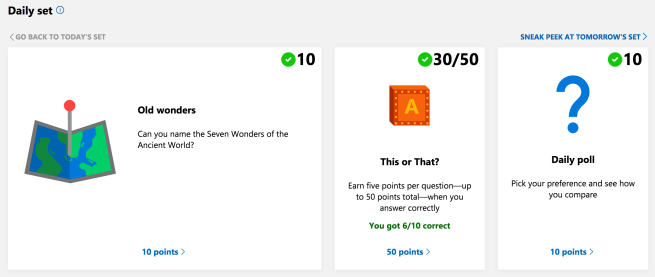
There are three primary ways to earn points. The first is by completing the Daily Set. Each day, a set of three activities awaits at the top of your Microsoft Rewards account dashboard. These include a daily search, a quiz, and a daily poll. Completing the Daily Set takes about two minutes, and will earn you anywhere from 30-70 points depending on the day. These sets also have an added bonus: for every few days that you consecutively complete them, you’ll earn up to 150 extra points.
The second and third ways are by using Bing. Currently, I’m able to earn 150 points per day searching on my desktop, and 100 points per day searching on my mobile device. Each search is worth five points, so that amounts to 30 desktop searches and 20 mobile searches. These can easily be completed in a few minutes.
You can also earn points by completing occasional special offers or by shopping online at the Microsoft Store. By simply completing the daily set and searches, though, you’ll earn enough to cover a Hulu subscription for as long as you’d like!
There are plenty of reward sites out there that promise free gift cards in exchange for minimal effort, but Microsoft Rewards is the real deal. With just a few minutes each morning, I’m able to guarantee myself access to hours upon hours of entertainment, which is made all the more enjoyable by the fact that it doesn’t drain my budget of a single cent!
Sign up for Microsoft Rewards here, and soon you’ll be watching Hulu for free!
 Big City, Small Budget